This tutorial provides a brief overview of how to move a specific tally record into a position higher or lower than its current position.
For this tutorial we'll cover adding a new tally record and moving it higher in the tally. This process can be repeated with existing records moving them either up or down.
This screenshot quickly illustrates with the current tally looks like, we want to add a Float Collar and move it into position 3 in our tally.
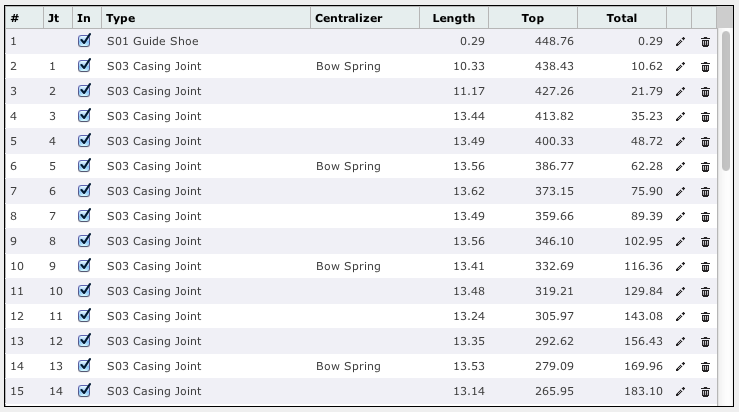
Step 1: Add the new record. We wanted to add a Float Collar so using the Tally Add Form we create the new record and click Add.

Step 2: Edit the new Float Collar record. This is the step you'd start from if you were moving an existing record.
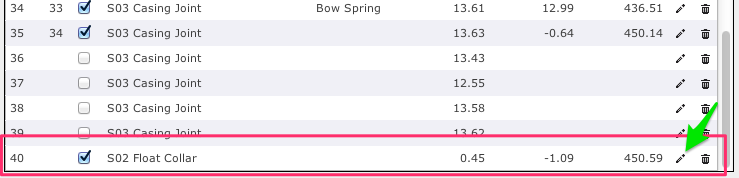
Step 3: Enter the new position into the far left input box under the # column. In this case, we're moving it into position 3 so we enter 3 as shown in this screenshot.

Step 4: Click the save button (the little disk icon) to save the changes.

Step 5: Once the record is saved it is now in the correct position and all of the other tally entries are properly rearranged.

If you have any questions about this tutorial, other tutorials, or have any other questions please contact us at support@petrosight.ca at your earliest convenience.
Thank you,
Petrosight Support Team
Was this article helpful?
That’s Great!
Thank you for your feedback
Sorry! We couldn't be helpful
Thank you for your feedback
Feedback sent
We appreciate your effort and will try to fix the article