New Mobile App
Enhancements
- Load Requirements are now supported on the new mobile app.
- When a driver clicks details and Start to begin a load, it will check if the Pickup(s) and Drop Off(s) associated to the load have any Requirements; if Yes’ it will check the Truck and Trailer to confirm it has the same Requirements.
- If a Pickup or Drop Off has a Requirement and the truck or trailer does not have the Requirement the user will receive a Warn or Block depending upon how this Requirement is configured.
- If a driver has the capability to add a load, when driver clicks create load, it will do a Requirement check for the Pickups and Drop Offs tied to the load and ensure driver has same Requirements.
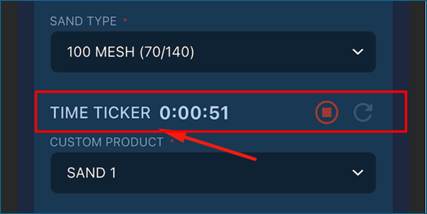
- On Setup > Definitions > Forms and Fields, a new field type is supported called TIME TICKER. When the Time Ticker field is added to Pickup or Drop Off form, and the driver is at Pickup or Drop Off, they will see the Time Ticker field, and we will display the name of this field (ie SERVICE TIME). Next to the field name will be a start and stop button. When the driver presses start, it will start counting time. When the driver presses stop, it will stop counting time. If a Time Ticker is still running when the driver clicks Print or Depart, it will automatically stop the timer and capture this amount of time. This field's data can be printed on the run ticket and/or sent back to the portal.
- On the mobile app, the calculation function MROUND will now work if the field displayed on the Pickup or Drop Off form uses this function.
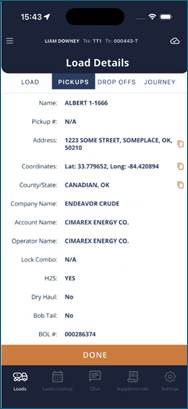
- On the Load Details screen, Address and Lat/Long have been added to the Pickup and Drop Off tabs. Users can copy these and paste them into navigation if desired.
Bugs/Issues
- When a driver clicks Details and Start, when on the Review Load Details page, the map overview displayed all the location PINS associated to the load, but only 1 label could be displayed, and driver had to click on other pins to see other location names. Now all labels will appear. This is only available on android run devices. IOS/Apple devices will only support one label at a time.
- When a select number of drivers went to my loads, their loads would not appear due to phonebook missing an email or phone number. This issue has been resolved, and loads will appear if phonebook user is missing email or phone number
- If Default Correction Factor was blank on the Setup > Pickup > Tank screen, it was displaying blank on the mobile app. A fix has been put in place to appropriately check default correction factor at Setup > Pickup level and Setup > Definitions > Forms & Field level.
- The Supplemental print out displayed a different format on the Pickup print out versus the My load screen printout display. This issue has been resolved.
Was this article helpful?
That’s Great!
Thank you for your feedback
Sorry! We couldn't be helpful
Thank you for your feedback
Feedback sent
We appreciate your effort and will try to fix the article