New Mobile App
Enhancements
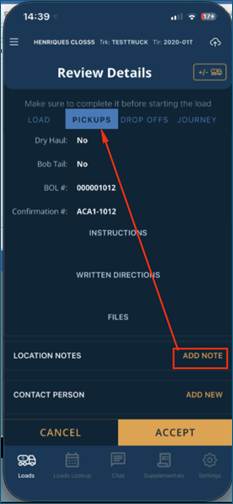
- Location Notes:On the Setup > Pickup or Drop Off screens and mobile application, portal users and drivers have the ability to add location notes.
- On the Mobile App > Load/Details Screen > Pickups or Drop Offs tab, when a driver selects a Pickup or Drop Off location, they can see existing notes or input a Location Note. Once saved this note will show up for other drivers completing loads at these locations and dispatch can see the note on Setup > Pickup or Drop Off screens. A note will be displayed on the mobile app unless the driver has deleted it or dispatch has archived the note or unchecked display on mobile. Drivers are only allowed to delete driver-created notes.
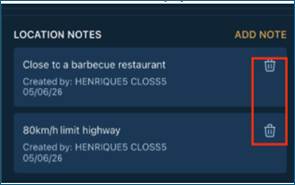
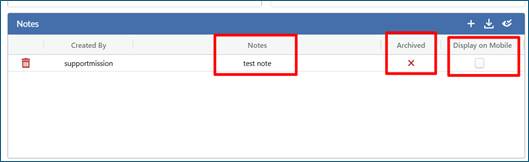
- On the portal, under Setup > Pickup or Drop Off screen, dispatchers can add notes for a location. These notes will appear to the driver if they are NOT archived and display on mobile is checked true. Dispatch can archive old notes or create notes they only want back-office staff to see by unselecting the display on mobile tab.
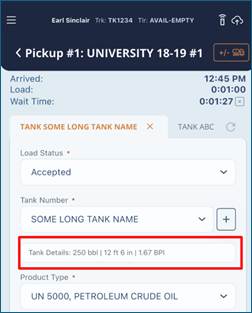
- On the Mobile app > Pickup or Drop Off screens, if Tank is part of the form, when a driver selects a tank, they will now be able to see capacity, height and BPI of the tank to help them select the correct tank or prevent driver from adding a new tank which has already been created under a different tank name. If a tank is strapped, it will display STRAPPED for the tanks BPI.
Bugs/Issues
- If DVIR/Pre/Post Trip Inspections are enabled and a driver marks a truck or trailer as unsatisfactory, if they attempted to select the same truck or trailer again immediately, it did not take them to the repairer page for the mechanic and driver to sign off on the fix. This issue has been resolved.
Was this article helpful?
That’s Great!
Thank you for your feedback
Sorry! We couldn't be helpful
Thank you for your feedback
Feedback sent
We appreciate your effort and will try to fix the article