Enhancements
Portal
New Advanced Dispatch Board Feature
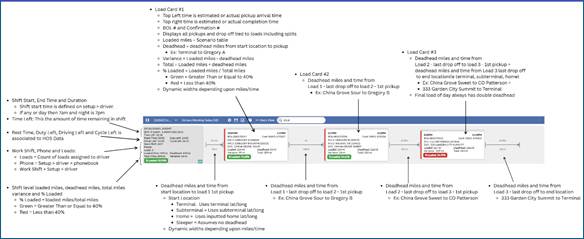
- The Advanced Dispatch Board view enables Dispatchers to see shift and load level loaded miles, deadhead miles, variances, % of loaded to total miles and estimated times. This will be a great tool for Dispatchers to identify inefficiencies in a Driver's shift.
- When a Driver's loads are added/removed/rearranged/rerouted, all the times and miles will automatically update.
- Times and miles will not automatically update if any of the following actions/scenarios are initiated (outlined below). This will be enhanced in a January build, so they automatically refresh times and miles.
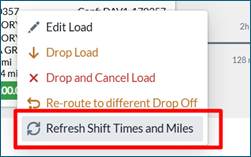
- Until the enhancement, a Dispatcher can right click on the Driver card or any load card tied to Driver's shift and click "Refresh Shift Time and Miles” to update the data.
- Below are actions, if taken will not automatically refresh times and miles.
- If a load shifts from yesterday to today, it doesn't recalculate them automatically. It retains stored info from the prior day.
- On Review, if a mass update or drop or drop and cancel load doesn't update times.
- Edit to Driver's home location lat/long, a load's Pickup location Lat/Long or Drop Off location Lat/Long.
- Editing Setup > Pickup avg load time or Setup > Drop Off > avg unload time.
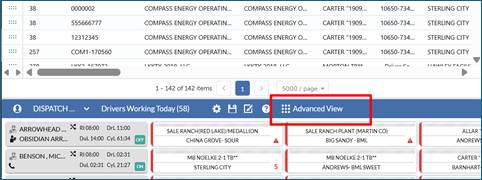
- On the Dispatch Board, In the Drivers working today section, click the Advanced View:
- Detailed Guide of Advanced Dispatch Board
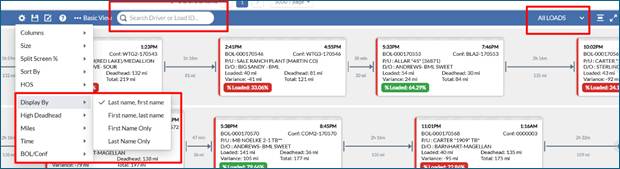
- Additional Filters, Search capability and display options have been added. In our January release, this will be enhanced so these changes can be stored in a profile.
- Under the settings gear icon, Dispatcher can alter how the Driver's Names are displayed in the Driver Card, can highlight all loads/Drivers with high deadhead (< 40% loaded), show or hide miles, times and BOL/Confirmation # within the Load card.
- In the Search Driver or Load ID column, if a Driver's name is input it will filter to only display this Driver or if a BOL # is input it will filter to only display the Driver with this BOL # assigned + highlight the load in yellow.
- A new drop-down menu option has been added to filter and display only loads with a particular status (i.e. Assigned, Ongoing, Reject, Complete).
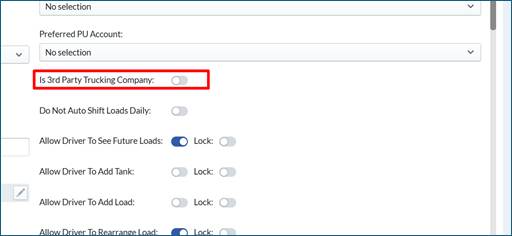
- On the Dispatch Board, if a Driver is defined as Setup > Driver > Is 3rd Party Trucking Company then shift and load times and miles will not populate on advanced Dispatch Board
- On the Advanced Dispatch Board, the Driver Available grid is automatically hidden for speed improvements. In a later January build, some of the filter options with the Driver Available grid will be added in the Drivers working today section.
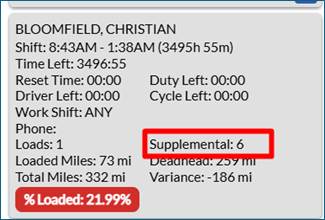
- On Dispatch Board > Advanced Dispatch Board, the count of Supplementals Loads are now visible
Other Portal Updates
- For rated Tickets using Dependency forms where there is > 1 Drop Off, on the Load/Ticket popout > Invoice or Payroll tab, users now have the ability to do overrides on all fields and Drop Off locations.
Legacy Mobile
- No Updates
API
- No Updates
Bugs/Issues
- On Setup > Driver, offset and buyback input fields allow positive or negative numbers
- On Review > Scheduled emails, Reports did not consistently send at end of month. This issue has been resolved.
- On Dispatch Board > Load/Ticket Popout > Map view, the locations which appear were not always the correct location due to a caching issue. This issue has been resolved.
- On Setup > Definitions > Forms and Fields, if a drop-down menu option was marked as INACTIVE, it did not save properly. This issue has been resolved.
- When a load is created, the source of this load is stored (i.e. API, Import, Auto, Manual or Scheduled). If users made changes to these loads the source would be updated. The source will always retain the original source of how the load was created.
Was this article helpful?
That’s Great!
Thank you for your feedback
Sorry! We couldn't be helpful
Thank you for your feedback
Feedback sent
We appreciate your effort and will try to fix the article