New Mobile App
Enhancements
- For Companies used to use Dispatch > Messaging feature, this will be replaced with live chat. Live chat enables Dispatchers and drivers to have a live chat.
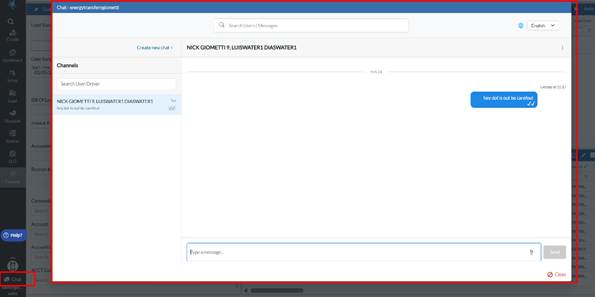
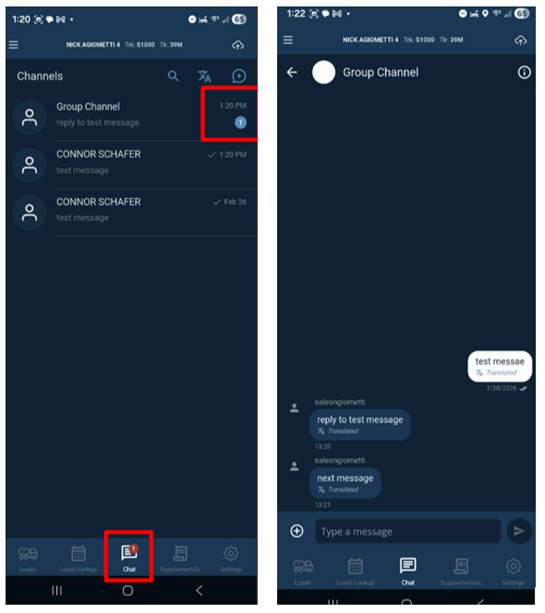
- On the portal, the chat button is currently available in the bottom left-hand corner. On the mobile app, the chat option will be on the bottom menu.
- Dispatchers can send messages to a single driver, all drivers of a terminal or commodity, or all drivers. When either Dispatch or a driver sends a message, a red notification will appear informing the user/driver a new unread message has been received.
- Users/drivers can click on the message and easily reply. Chat supports multiple languages, English, Spanish and French. In addition, users can attach images/videos to their chats.
- Messaging/Chat Portal View
- Messaging/Chat Mobile App View
- On Setup > Driver tab or Setup > Admin > Company tab, Allow Driver To See Future Loads permission is working.
- If turned ON, driver can see future loads assigned to them on the Loads Lookup button on bottom menu bar. If OFF, drivers will not be able to see future loads until they are logged into a given shift date.
- UI Improvements have been made to provide better contrast between font colors and background colors
- A new “pReview” button has been added to the Pickup and Drop Off screens next to the print button. When driver clicks “pReview”, it will allow them to see the run ticket before they print to ensure everything looks good.
- On Android only devices, under settings, two new options have been added. Device Settings and Device Home Screen. When a user clicks device settings it will take them to Android > Settings > Apps > PakTransport app for user to be able to clear data/cache/force stop. If MDM blocks this feature, the driver will not be allowed to go here. When a user clicks Device Home Screen, it will take them to the Home screen of the app.
Bugs/Issues
- For Crude trucking companies, the Avg Line Temp and CF were not printing on the run ticket. This issue has been resolved.
- Custom Drop Off form calculations are now working properly.
Was this article helpful?
That’s Great!
Thank you for your feedback
Sorry! We couldn't be helpful
Thank you for your feedback
Feedback sent
We appreciate your effort and will try to fix the article