Portal
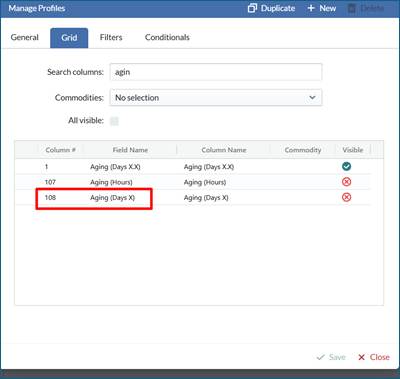
- Aging Days- On the Load > Manage Load, Dispatch board > Open Load grid and review screen, we have added back Aging Days as a whole number. Aging Days X is the new variable we added back.
- Aging Days is currently the Assigned Pickup Date/Shift Date selected minus the Requested Pickup date. This variable does not use the new setting on company tab where a user can choose between requested Pickup date/time or Load creation date/time.
- In a recent build we added Aging Days with decimals and Aging Hours and received feedback from some Customers that wanted the Aging Days as a whole number as an available field.
- On Setup > Definitions > Forms and Fields an Audit Trail have now been added to track any changes made to Fields or Forms.
- On Dispatch > Schedule an Audit Trail have now been added to track any changes made to a drivers schedule.
- For Crude haulers, Tanks and Readings can now support 1/4, 1/8 and 1/16
- On Setup > Pickup or Drop Off > Tank/Equipment section. When adding or updating a tank the user can define the reading precision. For incremental strappings, the height and the strap factor must be input at the precision level defined.
- On Setup > Pickup or Drop Off > Tank/Equipment section. When adding or updating a tank the user can define the reading precision. For incremental strappings, the height and the strap factor must be input at the precision level defined.
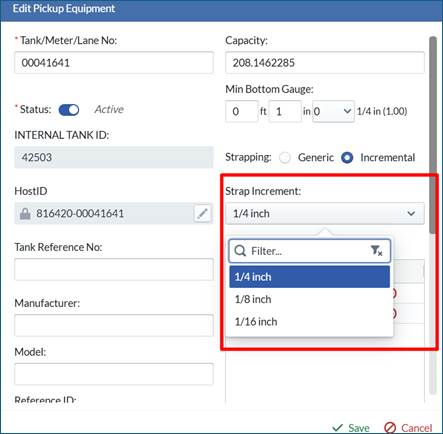
- On the Load/Ticket > Ticket screen or Mobile Pickup or Drop Off Forms, if Tank/Equipment option is on the form and there is a ft, in, 1/4” field type, the correct precision will display in the drop down for the driver to select.
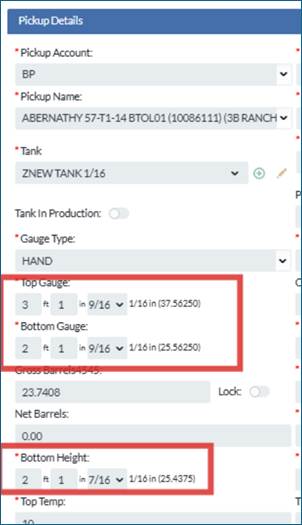
- Example of 1/16 precision tank
- Example of 1/16 precision tank
Mobile
- NA
API
- NA
Bugs/Issues
- On Finance > Invoice and Payroll screens, if a ticket had a split Drop Off, only one of the Drop Off tickets would get associated to the Invoice or settlement when it was created. A user would have to manually add the one which did not get associated. This issue has now been resolved.
- On Finance > Invoice and Payroll screens, in some use cases Reject tickets were not calculating. This issue has been resolved.
- Setup > Code tab > Time Off Days vs Hours. When defining the time off days or hours, the label in the column always displayed days. This has now been resolved.
- On Review, Invoice and Payroll. If a user stored multiple Pickup locations in a profile, when they search user would receive an error. This issue has been resolved.
- On Load > Manage scenario screen, if a user wants to update Loads after a specific effective date, the date selector only allows todays date or historical.
Was this article helpful?
That’s Great!
Thank you for your feedback
Sorry! We couldn't be helpful
Thank you for your feedback
Feedback sent
We appreciate your effort and will try to fix the article