New Mobile App
Enhancements
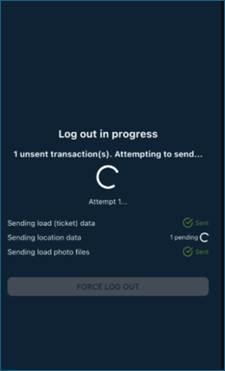
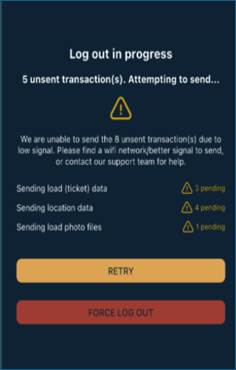
- When a driver logs out or Submits Shift/Logout, a new screen will Appear if there are unsent transactions. The driver will see how many unsent transactions they have in total and a breakdown of how many load/ticket data transactions, location date transactions (geopings) and load photo files are unsent. Multiple attempts to send the transactions will automatically occur. If the transactions are still unable to send, the driver will be notified of how many unsent they still have and it will inform driver to find a WIFI connection or better signal and retry. If the driver retries multiple attempts and still cannot get the transactions to send we ask the driver to contact our Support or they can force the logout with unsent transactions.
- When a driver logs into PakTransport and they have not logged into Geotab, the driver will be prevented from logging into PakTransport and be directed to login into Geotab first.
Bugs/Issues
- If a driver fails to submit their shift or driver has unsent transactions on their shift, when they login the following shift, the historical shift transaction was being Applied to today's shift. This issue has been resolved.
- Driver would receive a print preview error when attempting to print out historical loads. This issue has been resolved.
- In some use cases, when drivers login they would receive a shift error. This issue has been resolved.
- If a driver is logged into the App and the App is put into the background, in some use cases, the mobile App would crash when they return to the App. This issue has been resolved.
- If a driver has less than 1 minute of wait time, the driver was able to input wait time notes, but the wait time would get recorded as 0 and the back-office user couldn't see the wait time notes which were printed on the run ticket. This issue has been resolved.
- In some use cases, a driver had wait time and recorded wait time notes, but on the run ticket and what was sent to back office the wait time was 0. This issue has been resolved.
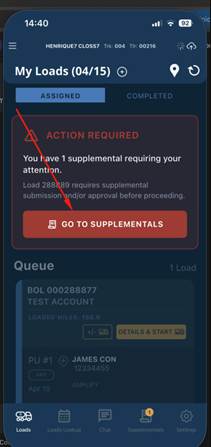
- When a Supplemental is sent from back office to the driver and it's required, when the driver attempts to click Go To Supplementals, the driver is not taken to the supplemental. This issue has been resolved.
Was this article helpful?
That’s Great!
Thank you for your feedback
Sorry! We couldn't be helpful
Thank you for your feedback
Feedback sent
We appreciate your effort and will try to fix the article