New Mobile App
Enhancements
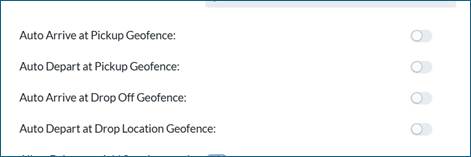
- On the Mobile app, Auto Arrive and Auto Depart feature is now available. On the Setup > Admin > Company tab, a user can determine if they want their drivers to Auto Arrive and/or Auto Depart at Pickup and Drop Off locations.
- When a driver starts a load, if Auto Arrival is enabled when driver gets within the Geofence of this location it will automatically move the driver to the Pickup screen. If Auto Depart is enabled, when driver leaves the location/Geofence, it will first validate that all required fields are populated for that load, and if completed, it will move the driver to the “Driving” to the next location screen.
- IMPORTANT: Please be aware that a driver can still manually progress thru a load when this feature is enabled.
- *NOTE: We recommend only turning on these features if you have the Samsara, Motive or Geotab integration. Mobile geolocation information is not as accurate as geolocation information coming from the ELD and can lead to driver frustration.
- Auto Arrive Options on Admin > Company tab
Bugs/Issues
- On the Run ticket, if a legal description was extremely long it was causing a formatting issue on the run ticket. We will now only display first 2 rows of the legal description to ensure run ticket format remains intact.
Was this article helpful?
That’s Great!
Thank you for your feedback
Sorry! We couldn't be helpful
Thank you for your feedback
Feedback sent
We appreciate your effort and will try to fix the article