OnPing’s User structure can take a bit of getting used to. This document will go through some of the main terminology used to define the relationships between users and groups.
All groups live as part of a big tree. They have parent, sibling, and child groups. If one group is a parent of another, we call the parent group the “super group.” This is one of the terms you define for any group you add.
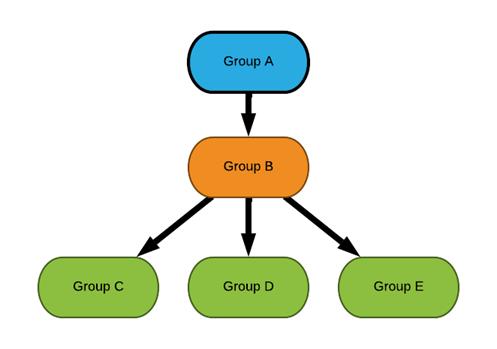
Almost everything you interact with in OnPing is a member of a group. We will call these items assets. A few common assets in OnPing are Companies, Sites, and Locations.
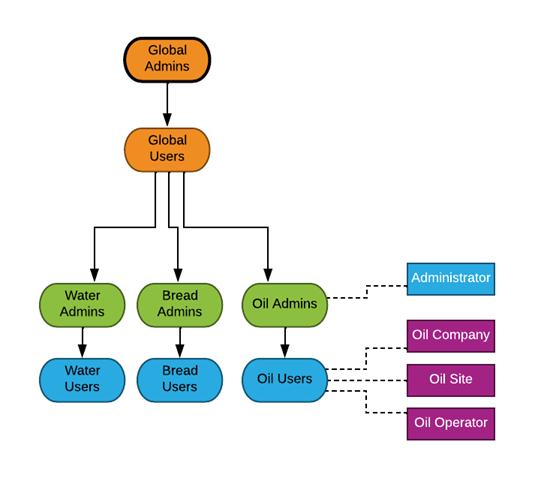
The tree structure of our groups determines how permissions propagate. If you are in a group for an asset, you have read but not edit permissions. If you are in a super group of the group an asset belongs to, you have edit permissions.
Another important entity to consider for permissions is the User. Users are the only assets in OnPing that can belong to multiple groups. This is useful when an organization has multiple business units with different required levels of visibility.
Special Notes On Users
Because users are the ones taking actions in OnPing, they have special discussions about permissions.
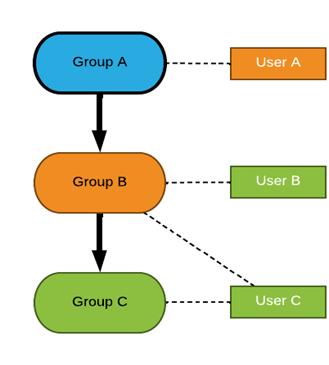
Here is a diagram of the users and groups we will discuss.
Editable Users
When can one user make changes to another? If a user is a member of a group that is superior to all the groups of another user, then the user in the super group can edit that other user. In our diagram, User A can edit Users B and C. We would call Users B and C editable users for User A.
Assignable Users
A different problem that arises is when a user needs to assign someone to an alarm. Who gets to do that?
If a user is in a group that is superior to one of the groups a user belongs to, then that user can assign the other user to alarms. In our diagram, User A can assign User B and User C to alarms. User B can assign User C. We would call User C an assignable user for User B.
Notice this is a weaker requirement than Editable Users.
Typical Asset Configurations
Admin Group, User Group
The most common way OnPing is set up is with a company admin group and a company user group.
Below are a few examples of how to configure a. Asset with this setup.
Case 1: Setting up a company, site or location
Companies, sites, and Locations Generally need to be set up as user groups so that all personnel can see them.
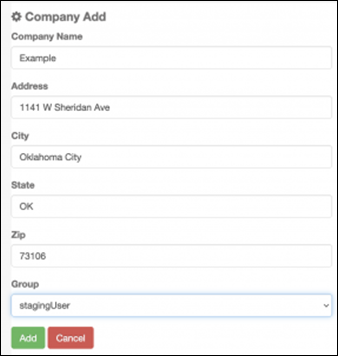
Case 2: Setting up an alarm
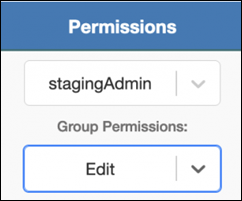
Alarms are usually set up as Admin. They have a special permission level called edit which they are usually set up with.
Was this article helpful?
That’s Great!
Thank you for your feedback
Sorry! We couldn't be helpful
Thank you for your feedback
Feedback sent
We appreciate your effort and will try to fix the article