Importing custom tables is efficient when multiple parameters are needed, such as adding multiple setpoints to one table. LibreOffice or Excel is required to import custom tables.
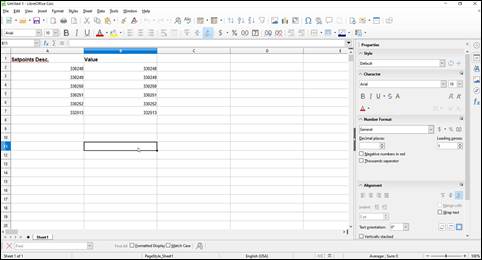
- Once you have created a custom table widget on the location dashboard, open Libre Office and label the first row as below. Enter the PIDs in both columns that you want to show on the table. The first row will be for the name and the second will be the value.
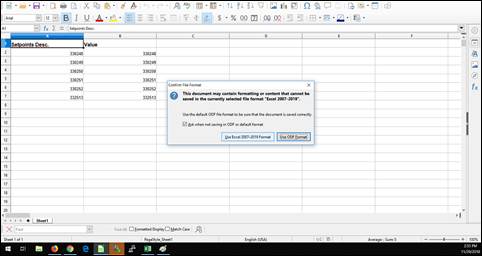
- Save the document and click “Use Excel 2007-2019 format.”
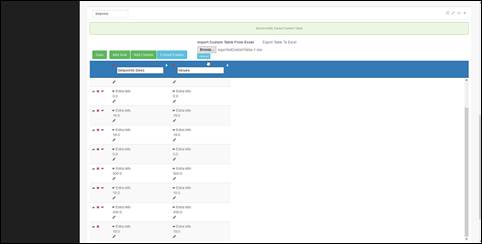
- On the location dashboard. Click “save” before uploading the document. Then browse the file and upload it to OnPing.
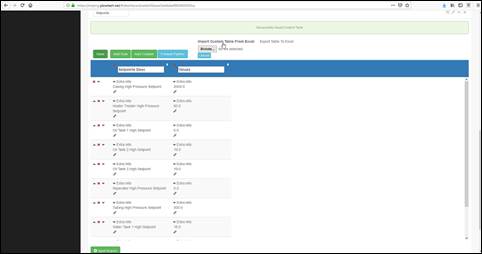
- Click “Extra Info” in the first column and select the name, location, etc. that you want the description to read. Then click “Save” and “Update Dashboard” to fully save the table.
If you have any thoughts, ideas, or questions, please feel free to leave a comment below or use the contact feature at www.onping.net
Was this article helpful?
That’s Great!
Thank you for your feedback
Sorry! We couldn't be helpful
Thank you for your feedback
Feedback sent
We appreciate your effort and will try to fix the article